Monitor at Eye Level
Position the top of your screen at or slightly below eye level. This may help keep your neck in a neutral position and reduce the tendency to lean forward.
Practical guidelines for setting up your workspace and building movement habits that support comfort and productivity.
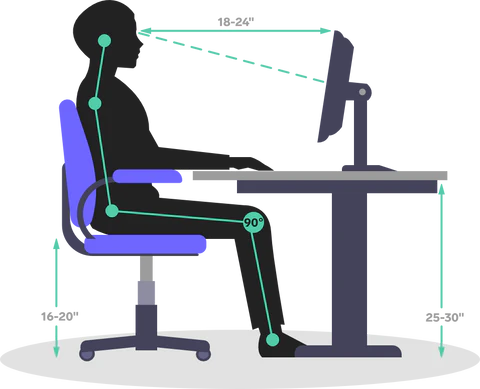
A well-organized desk environment can make a meaningful difference in your daily comfort. Small adjustments to your monitor height, chair position, and keyboard placement may help reduce strain during long work sessions.
The key principle is keeping your body in a neutral, relaxed position. Your screen should be at eye level, arms parallel to the floor when typing, and feet flat on the ground.
Consistent small actions that can contribute to a more comfortable and productive work experience.
Position the top of your screen at or slightly below eye level. This may help keep your neck in a neutral position and reduce the tendency to lean forward.
Set your chair so that your thighs are parallel to the floor and your feet rest flat. Your knees should form approximately a 90-degree angle.
Keep your keyboard and mouse close to your body at elbow height. Your wrists should remain straight and relaxed while typing.
Position your screen to avoid glare from windows or overhead lights. Good lighting may help reduce eye strain and support a more comfortable visual environment.
Take a brief movement break every 45-60 minutes. Even standing for 30 seconds or adjusting your sitting position can make a difference over the course of the day.
Additional strategies for those looking to further refine their workspace setup and daily movement habits.
A comfortable room temperature and good ventilation can help you stay alert and comfortable. Consider a small fan or adjusting thermostat settings throughout the day.
Keep water within reach. Regular hydration naturally encourages movement breaks as well, creating a built-in reminder system for your body.
A clutter-free workspace may help reduce visual stress and allows proper arm and hand positioning. Keep frequently used items within easy reach.
If available, alternate between sitting and standing throughout the day. Even short standing intervals can activate different muscle groups and reduce monotony.
All materials and practices on this site are for general educational and informational purposes only. They are not medical advice, diagnosis, or treatment. Individual results vary. Before starting any exercise or ergonomic practice, especially if you are pregnant, injured, or have a chronic or acute health condition, consult your doctor, physiotherapist, or other qualified health provider.